





Due to unforeseen circumstances, we are unable to fulfill ALL Home orders until Oct 20. Please keep this in mind when placing orders. Apologies for the inconvenience.
Jungle Celebi (6IV, Shiny, Event, Battle Ready) – Pokemon Sword and Shield
$6.00
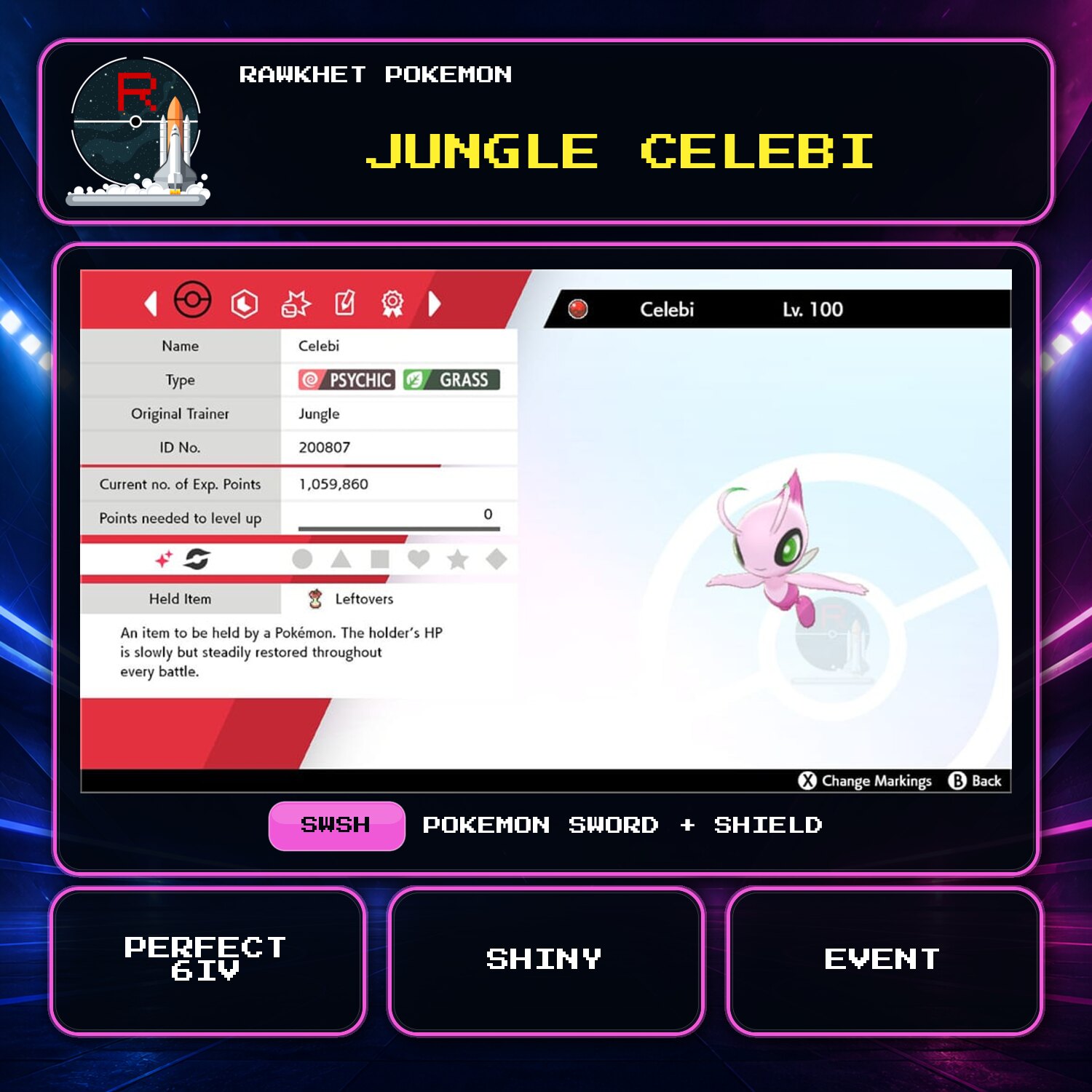
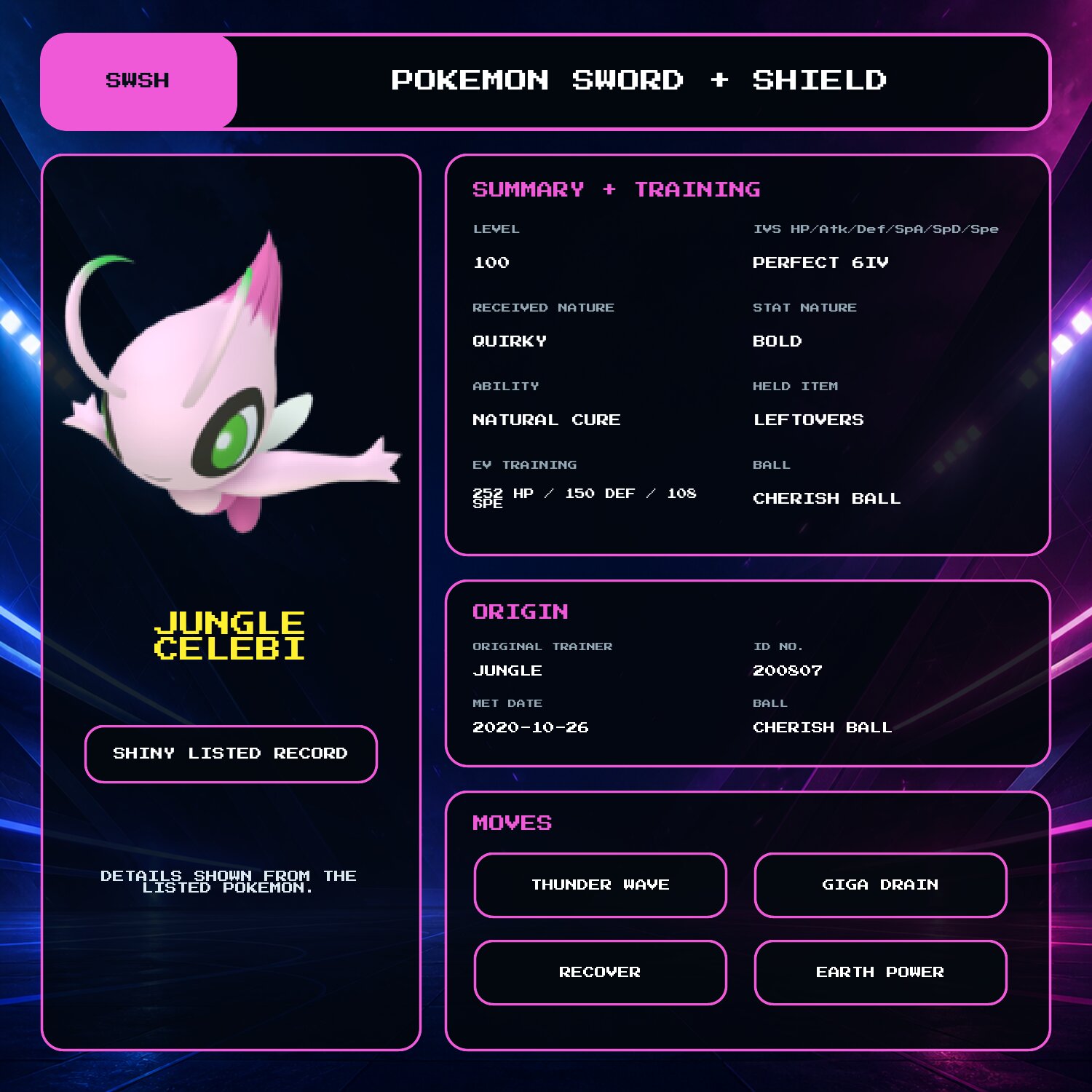
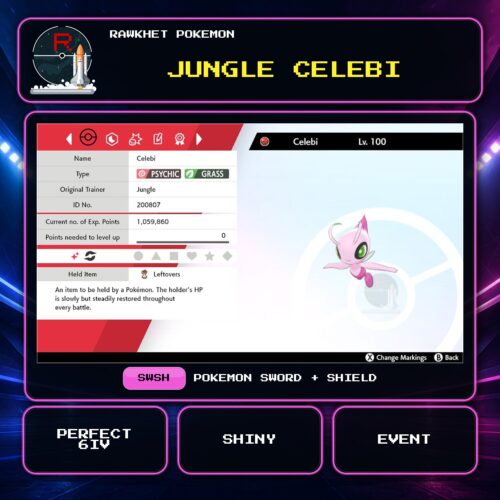
Get the Shiny Celebi event with OT Jungle for Pokemon Sword and Shield. It is level 100 with perfect 6IV stats, a Quirky received Nature, and a Bold stat Nature.
Shiny Jungle Celebi event
This listing includes the Shiny Celebi event with OT Jungle for Pokemon Sword and Shield. Celebi is level 100 with perfect 6IV stats and a fixed battle-ready build.
Fixed Celebi build
- Nature: Quirky received Nature with a Bold stat Nature
- Ability: Natural Cure
- Held item: Leftovers
- EVs: 252 HP / 150 Defense / 108 Speed
- Moves: Thunder Wave, Giga Drain, Recover, and Earth Power
The event record is fixed. Its Jungle OT cannot be replaced with a Trainer Name.
Delivery
Celebi is delivered through Y-Comm Link Trade in Pokemon Sword and Shield. You need a Nintendo Account, Nintendo Switch Online, and one Pokemon to trade in return. See the Sword and Shield Trade Guide for the collection steps.
14 reviews for Jungle Celebi (6IV, Shiny, Event, Battle Ready) – Pokemon Sword and Shield
Preparation: eligible in-game orders can prepare automatically after payment. We will email you a collection link when an automatic order is ready. Pokemon HOME, Let's Go, and orders needing review are handled manually, usually within 24 hours. See the preparation and collection FAQ for details.
Legitimacy: every Pokemon we send is legal and passes legality checks. Safe for online play and ranked battles. Since 2016 we have completed over 450,000 trades with zero reported bans. Some Pokemon cannot be moved into Pokemon Home. Where that affects a listing, its description says so, and the Home Restrictions page has the details.
What you'll need: your game, a Nintendo Account, and a Nintendo Switch Online subscription. Pokemon Home orders need a Home Premium plan instead.
Our guarantee: if we can't complete your order due to a fault on our side, you get your money back. The full policy is in the FAQ, and the Trade Guide walks you through your first trade.
Please fill out the form below with your questions about this product.
To trade in Pokemon Sword and Shield, you'll need a Nintendo Account and an active Nintendo Switch Online subscription. Your Switch Friend Code and in-game Card Code are unnecessary.
- Press the [Y] button to open the Y-Comm.
- Press [+] to connect to the Internet. The top right should say "Internet".
- Choose Link Trade and then Set Link Code.
- Open the collection link in your ready email. When prompted, enter the Link Code shown on the trade page. For a staff-arranged trade, use the code sent by the team.
- Wait for the trade to be established. Stay in the overworld and do not open any menus. It should say "Searching..." at the bottom left.
- For collection-link orders, follow the retry and help instructions on your trade page. For a staff-arranged trade, if we don't connect within a minute, reply to let us know (no need to retry) so we can try another code.


Please ensure you have a stable Internet connection to trade. To check if you can trade online with Rawkhet (and others), do a Test Connection on your Switch (System Settings > Internet > Test Connection) and ensure that your NAT Type is A, B, or C (where A/B is ideal).
NAT Type D and F will NOT be able to connect with other players. Mobile hotspots from your iOS or Android device, public WiFi, and work/enterprise WiFi are usually NAT Type D. Use a different network or find troubleshooting steps on Nintendo Support.


Joezoellner0@gmail.com –
Pokémon is great! Great customer service, and the trade was made incredibly easy!
MDL –
Love love love this shiny onion, the cutest ever. They delivered it so quickly too! Thank you!
Dakota Green –
Perfection as always.
Antonio Pulido –
Compra exitosa desde Chile! Muchas gracias
Joe Whiteman –
Fast and easy. Good communication.
Gunni –
Excellent service, could not believe something like this exist to have top tier pokemons, these guys made my day on a next lvl cause I’m absolutely a fan!!!
Irsyad Ahmad –
Really amazing service! Very fast service and also inexpensive for a special Pokemon
Tonesfish –
super fast delivery! I love my new baby 💛
Christopher Wagner –
Super fast service and our new Pokemon arrived exactly as advertised! My son was so bummed that we missed out on the event Pokemon and now his whole day is made 🙂
Nox_Tenebris –
I wanted this Celebi to be as legit as possible so I asked for the Celebi to not be EV trained and be the default level 60 that the event Celebi actually came at, and they delivered.
Original trainer name is “Jungle”, it has the Wishing Ribbon, and the description even says it came from a 2020 Pokemon Movie. In other words, this Celebi is the exact same as the legit ones everyone got from the event!
Shilo Endersbe –
Amazing customer service! Very fast as well. The Pokémon is everything I wanted and more! Also very inexpensive for the quality of the Pokémon and the customer service. I will definitely be a frequent customer!
cmgw –
I’ve ordered about half a dozen different things through Rawkhet and each time is great. Great communication, quick turnaround, and exactly what I ask for each time!
Jack Stewart –
Recieved Email WAY before the estimated 12 hours, Bought Zarude and Jungle Celebi to test if it was legit. They were! Thank you RawkhetPokemon! Celebi were EV Trained weirdly (Not sure if that’s the battle ready EVs), but otherwise great!!!
Daniel –
I love my shiny Celebi. Sucks we don’t have those events here and the US but don’t worry this website can help you with that.